소프트쉐어-AI,무료소프트웨어,무료프로그램 공유마켓

본문 바로가기

팝업레이어 알림

팝업레이어 알림이 없습니다.
내 PC의 OS와 브라우저 정보입니다. ex icon
os 알 수 없음
browser 알 수 없음

AOS

자동차

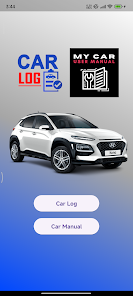
Hyundai Kona Manual and CarLog

Hyundai Kona car Log Maintenance and repair records users can now maintain log of the following records Car Log Engine Oil Keep a record of when the oil was changed what was the mileage the brand name of the oil used and when is the next oil change due Saves the log of all the previous oil changes Car Log Air Conditioner Maintenance Add maintenance records related to A/C service like when was the gas replaced or any other aircon related maintenance log Car Log Air Filter Replacement records of air filter Car Log Battery Any batteryrelated issues and at what mileage was the battery replaced Car Log Brake Oil Brake oil change records including date and mileage and reminders when the next brake oil change is due Car Log Brake Pads Brake Pad change records including date and mileage and reminders when the next brake pad change is due Car Log Fuel Filter Car Log fuel filter change records including date and mileage and reminders when the next fuel filter change is due Car Log Gearbox Oil Keep a record of when the gearbox oil was changed what was the mileage brand name of the transmission oil used and when is the next oil change due Saves the log of all the previous gearbox oil changes Car Log Spark Plugs Keep a log of any SparkPlug related issues and at what mileage was the spark plugs replaced Also can keep a record of brand names used Car Log Tyres Keep the record of dates and at what mileage the tires were replaced Timing Belt Keep a log of any timing belt related issues and dates and mileage of any replacements User Manual if you are an owner of Hyundai Kona vehicle this app will help you in your daytoday use No need to go through a traditional paper book handbook Glance through this digital version of Car to resolve your issues and all the howtos and nittygritty When and which oil to use and a lot more Download and refer to it as many times you want without the risk of losing it The topics covered in this Hyundai Kona Manual include Your vehicle at a glance Exterior Overview Interior Overview Instrument Panel Overview Engine Compartment Safety system of your vehicle Important Safety Precautions Seats Child Restraint System Air Bag Advanced Supplemental Restraint System Convenient features of your vehicle Accessing Your Vehicle Door Locks TheftAlarm System STEERING WHEEL Mirrors Windows Sunroof Exterior Features Instrument Cluster LCD Display Lighting Wipers and Washers Driver Assist System Manual Climate Control System Automatic Climate Control System Windshield Defrosting and Defogging Climate Control Additional Features Storage Compartment Interior Features Infotainment System Driving your vehicle Before driving Ignition switch Automatic Transmission Dual clutch transmission Braking system All Wheel Drive AWD Lane Keeping Assist LKA system Cruise Control Smart Cruise Control system Special Driving Conditions Winter Precautions Vehicle load limit Trailer towing What to do in an emergency If the engine will not start Jump starting If you have a flat tire with tire mobility kit Towing Maintenance Engine compartment Owner39s Responsibility Scheduled maintenance services Engine coolant Brake fluid Washer fluid Air cleaner Wiper blades Battery Tires and wheels Tire Care Fuses Light bulbs Appearance care Emission control system California perchlorate notice Specifications Consumer information and Reporting safety defects Dimensions Engine Bulb Wattage Tires and Wheels Volume and Weight Air Conditioning System Vehicle Identification Number VIN Vehicle Certification Label Tire Specification and Pressure Label Engine Number Consumer Information Reporting Safety Defects Depending on where you are in the world you may hear them also referred to as Hyundai Kona Owner39s Manual Hyundai Kona User Manual Vehicle Owner39s Manual Hyundai Kona Handbook Car Workshop Manual Car Service Manual Car Repair Manual Hyundai Kona User Guide Car Operator39s Manual
  • 평점
  • 평점 0
  • 무료

39

자세히보기

AOS

자동차

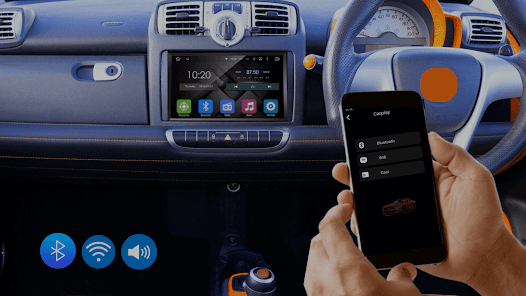
Auto Link Android Car Play

Easily connect your Android phone to your car39s display using Auto Link Android Car Play Carplay Android let you connect your phone to your car in different ways like Bluetooth WiFi or cast With Bluetooth you can connect to the car39s system wirelessly These options make it easy to access your phone39s features and smoothly link it to your car39s infotainment system Link your smartphone to the car39s system via WiFi Bluetooth or cast and enjoy your favorite apps right on the car39s dashboard Whether you39re using Samsung or another brand Carplay Android Auto works with all mobile devices The Auto Link Android Car Play is simple to use and provides an excellent experience making long drives more enjoyable With Auto Link Android Car Play you can watch movies view photos and play games on your car39s big screen Once your phone is connected everything starts and stops automatically The setup process is quick and hasslefree Carplay android Auto ensures smooth and seamless interaction between your phone and car Its userfriendly and handsfree features make accessing apps safe and convenient while driving With the CarPlay app staying connected on the road has never been easier The Carplay app works with many cars and makes managing multiple vehicles simple You can access all your cars in one app Whether you drive a Honda Toyota Tesla MercedesBenz Kia Hyundai or even a RollsRoyce the app has you covered Enhance your driving experience with Auto Link Android Car Play Download now and take full control of your car39s infotainment system like never before
  • 평점
  • 평점 0
  • 무료

156,851

자세히보기

AOS

뷰티

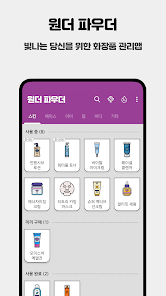
원더 파우더: 화장품 목록, 사용기한, 화장대 정리

보유한 화장품이 많아질수록 제품 목록과 사용기한을 챙기기가 어렵죠 코덕의 차별화된 화장품 관리 비결 원더 파우더와 함께하세요 카테고리별 뷰티 아이템 메이크업 스킨케어 바디케어 등 다양한 카테고리의 화장품을 관리할 수 있어요 미리 준비된 기본 품목 외에도 사용자가 직접 원하는 제품을 자유롭게 등록할 수 있습니다 사용 상태별 구분 사용 중인 화장품 미리 구매한 화장품 사용 완료한 화장품 등 상태별로 구분하여 편리하게 관리할 수 있어요 브랜드 화장품 브랜드를 입력하고 브랜드별로 모아서 제품을 확인할 수 있어요 사용기한 자동 설정 제품의 개봉일을 입력하면 해당 제품의 사용기한을 자동으로 설정해 줍니다 이렇게 설정된 사용기한을 한눈에 파악하여 보다 안전하게 제품을 사용할 수 있어요 갤러리 보기 방식 격자 목록 보기 방식 외에 실제 제품 사진으로 목록을 직관적으로 확인하는 갤러리 보기 방식도 제공합니다 화장품 정렬 기능 보관 중인 화장품을 사용기한 임박순 이름순으로 정렬하여 확인할 수 있습니다 손거울 기능 카메라를 이용하여 간편하게 얼굴을 체크하고 화장을 고칠 수 있는 심플한 손거울 기능을 제공합니다 개발자 연락처 주원더플 수지구 수지로342번길 34 5층 603호 풍덕천동 신촌빌딩4 용인시 경기도 16837 South Korea 3978703144 2024용인수지1010 용인시 수지구청
  • 평점
  • 평점 4.8
  • 무료

140

자세히보기

AOS

뷰티

1,981

자세히보기

회원로그인

회원가입

브랜드 소프트쉐어

대표 김동영

사업자번호 428-81-02729

통신판매업신고번호 2023-부산해운대-0096호

개인정보책임자 김동영

주소 : 부산광역시 해운대구 센텀중앙로 78, 센텀그린타워 504호