소프트쉐어-AI,무료소프트웨어,무료프로그램 공유마켓

본문 바로가기

팝업레이어 알림

팝업레이어 알림이 없습니다.
내 PC의 OS와 브라우저 정보입니다. ex icon
os 알 수 없음
browser 알 수 없음

AOS

지도/내비게이션

153,260

자세히보기

AOS

지도/내비게이션

SailTimer™

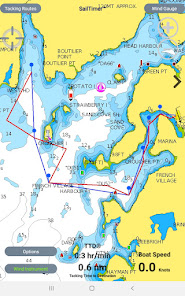
Whether you are going out fishing waterskiing sailing or crossing open water this app shows you an animation of wind direction and wind speed and contour lines of precise wind zones The app was originally designed to help sailboats navigate But now the charts and crowdsourced wind maps are useful for power boats sailboats kayaks kite surfers The marine weather forecast comes from satellite imaging which is not very accurate and does not actually measure the wind Fortunately with years of crowdsourcing from sailboats we have growing coverage with crowdsourced wind maps In coastal areas we archive the crowdsourced wind data to map how the wind flows around islands and into channels Then even if there is not live data there at a certain time we still know how the wind will flow there Crowdsourced maps like this have never been possible before A wind sensor tells you local wind around your boat but now you can know the wind and sea state up ahead or around the next point App Instructions and Unique Features Worldwide vector charts Google Maps and aerial photos If you have the Navionics Boating app you can import your Navionics charts here with a yearly subscription The white crosshair icon in the top left is the FollowMe button If clicked it turns blue and keeps your location in the center of the screen as you move Unselect when not moving to look around the map and when you want to zoom in and out GPS track can be displayed under options Save a screenshot to view or share your trip later The Wind Zones button has a small inapp subscription to see precise contour lines of wind zones or an animation showing wind direction and speed Features for Sailboats Standard GPS chartplotters and mapping apps do not account for sailboat tacking distances But if they do not know the distance you will travel how can they calculate your correct ETA SailTimer gives you a quick and easy display of your optimal tacks and TTD Tacking Time to Destination If you have the wireless SailTimer Wind Instrument wwwSailTimerco connected to your phone/tablet your optimal tacks will update automatically in this app as the wind changes Or you can manually enter wind direction and wind speed to see your optimal tacks for the route you are planning Waypoints Use the Tacking Routes button in the upper left to add new waypoints or to select from a list Just select a route to see the optimal tacks to each waypoint For wind use the wireless SailTimer Wind Instrument https//wwwSailTimerWindcom so that your tacks update automatically as the wind changes or enter wind speed/direction manually When you pass a waypoint press the gt on the right side of the screen to go to the next waypoint Press lt on the left side to see optimal tacks to the previous waypoint The optimal tacks are the same headings whether you do the port or the starboard tack first See the FAQs at http//sailtimerappcom/FAQhtml for hints about avoiding obstructions by switching to the other tack Polar plots The app comes with a default polar plot for calculating optimal tacks which you can edit Plus it can learn the custom profile for your boat39s speed on different wind angles polar plot Wind gauge button in upper right when using wireless Wind Instrument shows True and Apparent Wind Angle and Direction TWD TWA AWD AWA in TrueNorth and MagneticNorth reference Audio feedback is available by tapping screen to hear wind conditions More audio features are available in the SailTimer Wind Gauge app License Agreement http//wwwsailtimerappcom/LicenseAgreementAndroidpdf Navionics privacy policy and terms of use http//wwwsailtimerappcom/VectorChartshtml For any questions SailTimer Tech Support is prompt and helpful infoSailTimerco
  • 평점
  • 평점 0
  • 무료

59,615

자세히보기

회원로그인

회원가입

브랜드 소프트쉐어

대표 김동영

사업자번호 428-81-02729

통신판매업신고번호 2023-부산해운대-0096호

개인정보책임자 김동영

주소 : 부산광역시 해운대구 센텀중앙로 78, 센텀그린타워 504호