소프트쉐어-AI,무료소프트웨어,무료프로그램 공유마켓

본문 바로가기

팝업레이어 알림

팝업레이어 알림이 없습니다.
내 PC의 OS와 브라우저 정보입니다. ex icon
os 알 수 없음
browser 알 수 없음

AOS

의료

Blood test record

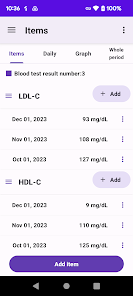
You can specify the date and record the results of the blood test Record blood test results and display them in a graph You can check the blood test results for each record in a line graph Record blood test results 1 tap the record button 2 Tap the blood test result item  Long tap/long press to set the current date 3 Select the blood test date and tap Next 4 Enter the measured value and tap OK 5 Enter a note and tap OK 6 Confirm and tap Done Blood test results for each record Tap the upper graph to display a line graph of blood test results for each record Item name change/delete/setting Tap each item at the top Tap the icon on the left side of the item name to open the menu The menu has the following items Item name change Move up Move down Item settings delete The item settings include the following items Input numerical value Graph display Enter memos etc Date display Transfer of model change data Tap quotModel change data transferquot in the menu to display the following selection screen File creation create a backup file for model change Restore restore data from backup file Step A Steps to create a backup file 1Tap quotModel change data transferquot in the menu 2 Tap Create file 3 Tap quotCreate filequot on the confirmation screen 4 Tap quotSelect appquot on the send screen 5 Tap Save to Drive Internet connection is required to save to the drive Step B Restore restore data from backup file in step A 1 Install this app on your new smartphone/tablet from google play Launch the app 2Tap quotModel change data transferquot in the menu 3 Tap Restore 4 Tap Drive 5 Tap My Drive 6 From the file list tap the file to restore Tap quotSortquot from the menu on the upper right to sort by quotModified date newest firstquot
  • 평점
  • 평점 0
  • 무료

97

자세히보기

AOS

의료

11,997

자세히보기

AOS

의료

Cardio Enlace

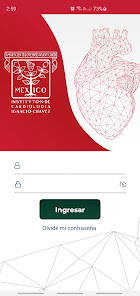
Cardio Enlace es una aplicacin diseada para mejorar el cuidado de los pacientes con insuficiencia cardiaca as como facilitar el enlace con sus mdicos tratantes fue creada con base a las recomendaciones dirigidas a los pacientes para su automonitoreo en casa y vigilancia de datos de alarma mediante la medicin diaria de diferentes parmetros como signos vitales antropometra habito de consumo de lquidos y actividad fsica as como su percepcin de bienestar con un formato simple y sencillo la aplicacin permite a los pacientes registrar sus mediciones diarias las cuales son enviadas al portal mdico de la aplicacin para que su mdico tratante pueda monitorear en tiempo real los datos enviados por el paciente los datos se presentan al mdico en forma de tablas y grficos para ver las tendencias del comportamiento de los diferentes parmetros del paciente da a da y que le permitan la deteccin oportuna de alguna descompensacin de la condicin de insuficiencia cardiaca del paciente que determinen una visita al mdico de manera presencial consultorio u hospital esta aplicacin permite al paciente estar en contacto estrecho con su mdico mediante un sistema de comentarios y alertas que el paciente puede mandar desde la aplicacin hacia el portal mdico adems tiene la finalidad de proporcionar educacin medica al paciente y/o su cuidador as como promover el apego a su tratamiento farmacolgico a travs de instructivos y recordatorios dentro de la aplicacin con las medidas de autocuidado e identificacin de datos de alarma para solicitar atencin medica as como recordatorios de ingesta de medicamentos
  • 평점
  • 평점 0
  • 무료

1,510

자세히보기

회원로그인

회원가입

브랜드 소프트쉐어

대표 김동영

사업자번호 428-81-02729

통신판매업신고번호 2023-부산해운대-0096호

개인정보책임자 김동영

주소 : 부산광역시 해운대구 센텀중앙로 78, 센텀그린타워 504호