소프트쉐어-AI,무료소프트웨어,무료프로그램 공유마켓

본문 바로가기

팝업레이어 알림

팝업레이어 알림이 없습니다.
내 PC의 OS와 브라우저 정보입니다. ex icon
os 알 수 없음
browser 알 수 없음

AOS

맞춤 설정

Field Watch 2 Wear OS 4+

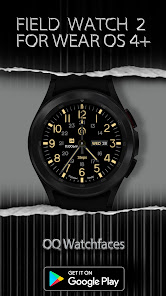
NOTICE READ THIS ALWAYS BEFORE AND AFTER DOWNLOADING OUR WATCH FACE TO AVOID ANY SITUATION YOU DON39T LIKE a This watch face for wear OS 4 devices contains a lot of options in customization menuIf for some reason it takes time to load customization options in Wearable app wait for at least 8 secs to let load up all customization menu options while opening on Galaxy wearable appif for some reason it takes time to open change to another face and change back to this one and it will work Blame Samsung for this b An Effort has be done to make a INSTALL GUIDE which is attached as an image with screen previewsIt is the 1st image in previews for newbie Android Wear OS Users or for those who do not know how to install the watch face to your connected device So it is requested to users to read it before posting cannot install statements reviews c DO NOT PAY TWICE FROM WATCH PLAY STORE READ The Install Guide Image again See 3 x methods 100 percent working to install both phone app and watch app The install guide clearly says tap to open connected on connected watch is when you are installing it for the first time FEATURES AND FUNCTIONS The watch face has following features 1 Tap on 12 o clock hour number to open watch Google Maps app 2 Tap on 6 o clock hour number to open watch Google Play Store App 3 Tap on 10 o clock hour number to open watch Compass app 4 Tap on 3 o clock hour number to open watch dial app 5 Tap on 9 o clock hour number to open watch messages app 6 Tap on 8 o clock hour number to open watch Battery app 7 Tap on Date or Day Text to open watch Calendar app 8 Tap on 4 o clock hour number to open watch Alarm app 9 Tap on 2 o clock hour number to open watch settings app 10 3 x different logos are available via customization menu 11 Seconds Movement style selection option is also available in customization menu 12 You can switch colors on/off for 24 hour index inner circle numbers for main display separately via customization menu 13 Dim Mode is also available via customization menu for both Main and AoD separately
  • 평점
  • 평점 0
  • 무료

106

자세히보기

AOS

맞춤 설정

Diver Classic 7 Wear OS 4+

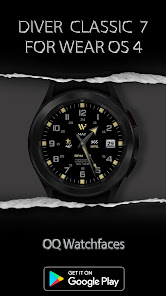
NOTICE READ THIS ALWAYS BEFORE AND AFTER DOWNLOADING OUR WATCH FACE TO AVOID ANY SITUATION YOU DON39T LIKE a This watch face for WEAR OS 4 contains a lot of options in customization menuIf for some reason it takes time to load customization options in Wearable app wait for at least 8 secs to let load up all customization menu options while opening on Galaxy wearable app If still issues clear data of the Galaxy Wearable App This is NOT a watch face issue its a bug never fixed for last 3 years by Samsung in Galaxy Wearable App b An Effort has be done to make a INSTALL GUIDE which is attached as an image with screen previewsIt is the 1st image in previews for Newbie Android Wear OS Users or for those who do not know how to install the watch face to your connected device So it is requested to users to read it before posting cannot install statements reviews c DO NOT PAY TWICE FROM WATCH PLAY STORE READ The Install Guide Image again See 3 x methods 100 percent working to install both phone app and watch app Even if you press pay it will not not be charged and just show an error and Ask you to wait for syncing of your purchase But now the Install button will appear on Watch playstore FEATURES AND FUNCTIONS The watch face has following features 1 2 x Pair of Hand Styles for Hours and minutes needle are available via customization menu as an option 2 Tap on 2 o clock index bar to open watch calendar app 3 Tap on 3 o clock index bar to open watch Google play store app 4 Tap on 4 o clock hour index bar to open watch dial app 6 Tap on 9 o clock hour index bar to open watch Google maps app 7 Tap on 10 o clock index bar to open watch battery settings menu 8 Tap on OQ logo below 12 o clock to open watch settings app 9 6 x complication invisible shortcuts are also available at 11121567 o clock customizable via customization menu 10 2 x customization complications are also available in customization menu 11 Background Styles are available via customization menu 12 Background Style for Always on Display is is pure black Amoled You can also hide or unhide complications shown on right of 9 o clock and on left of 3 o clock on AOD from customization menu of this watch face 13 Shadow on Top of the hour numbers can be turned on/off from customization menu 14 Seconds movement style can be changed also from customization menu 15 Tap on Date Text Block to open watch alarm app 16 Dim Mode is available for Main and Always on Display as well separately in customization menu 17 Tap on BPM text and it will open The Samsung Health Heart Rate Counter Developer39s Telegram Channel For Feedback and Discussions https//tme/OQWatchface
  • 평점
  • 평점 0
  • 무료

68

자세히보기

AOS

맞춤 설정

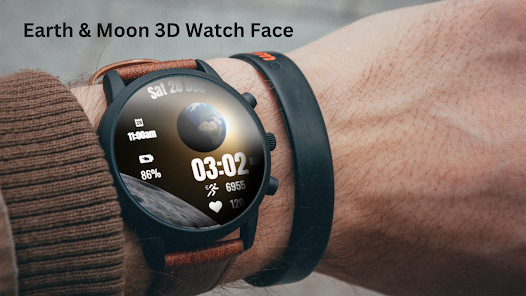
Earth & Moon 3D Watch Face

Immerse yourself in the cosmic beauty of space with the Earth amp Moon 3D Watch Face for Wear OS This unique watch face features a 3D animation of the moon spinning while showcasing a stunning view of Earth rising above the lunar surface Perfect for space enthusiasts or those who appreciate a dynamic celestial theme Watch Face Features 3D Animation Watch the moon spin while Earth slowly rises in the background Essential Stats Display time date battery percentage steps and heart rate SpaceInspired Design Minimal yet captivating designed to reflect the wonders of space Date month and day of the week Heart Rate Battery Steps Counter Ambient Mode Alwayson Display AOD Tap to measure heart rate Earth amp Moon 3D Watch Face Customization 1 Touch and hold display 2 Tap on Customize option Earth amp Moon 3D Watch Face Complications Touch and hold display to open customization mode You can customize the field with any data you want Battery For better battery performance of the watch we recommend disabling the quotAlways On Displayquot mode After installing the Earth amp Moon 3D Watch Face follow these steps 1Open the Companion App on your phone 2Tap quotInstall on Watchquot 3On your watch select the Earth amp Moon 3D Watch Face from your settings or watch face gallery Your watch face is now ready to use Compatible with all Wear OS devices API 30 including such as Google Pixel Watch Samsung Galaxy Watch etc Not suitable for rectangular watches Thank you
  • 평점
  • 평점 0
  • 무료

73

자세히보기

AOS

맞춤 설정

HD 3D Moving Wallpapers

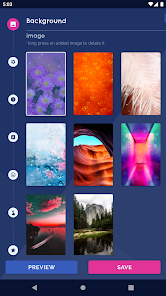
HD 3D Moving Wallpapers Background Live Wallpaper is a free wallpapers app with HD backgrounds clock magic touch emoji 3D wallpaper animated sparkling stars and more Free Live Wallpapers HD 3D Moving Wallpapers Background Live Wallpaper has multiple moving wallpapers with magic flowers and beautiful nature images hearts pattern backgrounds spring theme HD wallpaper multiple customize options like background changer frames animated sparkling stars magic touch analog clock emoji your name and more that work on the lock screen and they are all FREE Free Android Wallpapers The HD live wallpapers work on most Android phones such as Samsung Galaxy phones and can be used as p5w backgrounds Xiaomi live wallpapers wallpaper for Oppo phones and more HD 3D Moving Wallpapers and the spring theme and beautiful nature HD wallpaper works on tablets too Customize Create your own themes by adding clocks frames emoji animated sparkling stars magic touch to the background changer or even make it a 3D wallpaper or 4D wallpaper parallax wallpaper with parallax effect It works on the lock screen too Give It Parallax Effect HD 3D Moving Wallpapers Background Live Wallpaper can be applied as a spring theme 3D wallpaper or 4D wallpaper The parallax wallpaper has 3D depth and gives your screen and spring theme HD wallpapers a cool effect Multiple Free Backgrounds You can choose one of our many HD backgrounds or you can add your own pictures You can set up an automatic background changer with magic touch How to customize choose a free background or add your selfie set an automatic background changer add photo frames to the HD 3D Moving Wallpapers change the animated sparkling stars on the lock screen add magic touch color particle and sound add moving emoji from your keyboard make the live wallpaper a 3D wallpaper or 4D wallpaper parallax wallpaper add your name or custom text The HD 3D Moving Wallpapers app free has some of the best wallpapers for your Android phone and frequent cool new background themes Get the best wallpapers with free phone backgrounds and enjoy this live wallpaper free The HD wallpapers app have live wallpaper free and are one of the best mobile wallpaper apps Customize the wallpaper HD add a clock your name emoji animation magic touch particles and create your own wallpaper HD theme Other Live Wallpapers Autumn Flowers Live Wallpaper Luxurious Theme Diamond wallpaper free Flowers Blossoms Clock Watch Wallpaper You can add this hd live wallpapers to all phones Samsung Galaxy even J7 prime Xiaomi Huawei LG Lenovo Sony Pixel HTC ASUS Meizu Motorola Nexus and others
  • 평점
  • 평점 0
  • 무료

170,796

자세히보기

AOS

맞춤 설정

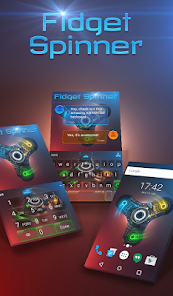
Fidget Spinner Wallpaper

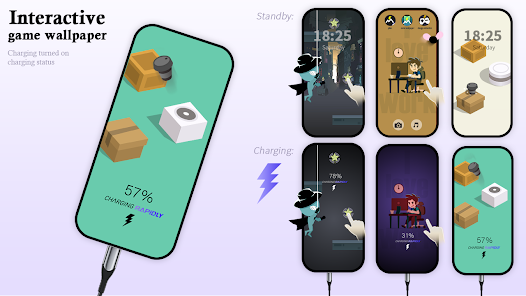
COOL THEME for your Android phone with free live wallpapers 4K and custom keyboard backgrounds Do you fancy a kit for a complete custom look of your Android phone Our app merges cool wallpapers custom keyboards and call screen gorgeous graphics It also gives great writing tools like cool emojis GIF creation voice input and a strong autocorrect feature Fidget Spinner Wallpaper is an awesome personalization app that gives your Android phone a stylish new look Wave cool wallpapers and keyboards apps help revamp a device in just 3 steps 1 Free live wallpapers 4K for home screen amp lock screen 2 Animated custom keyboard background 3 Call screen design Free live wallpapers 4K for home screen amp lock screen The cool wallpapers youll find in Fidget Spinner Wallpaper deliver gorgeous moving background artworks Highquality free wallpapers that fit your home screen amp lock screen You can choose the main wallpaper you get when you hit the SET WALLPAPER option Or you can browse other designs in the gallery for more 3D cool wallpapers and animated backgrounds HD wallpapers 4K alike Moving backgrounds art Battery SMART For custom home screen amp lock screen Matches Fidget Spinner Wallpaper theme design More free live wallpapers styles in the app gallery How to use the cool wallpapers for free Install Fidget Spinner Wallpaper Open the free Android theme app Hit SET WALLPAPER UNLOCK gt APPLY the wallpaper on your home screen amp lock screen Enjoy your new cool moving backgrounds Animated custom keyboard background The custom keyboard design with animated graphics is a great match for the cool live wallpaper This keyboard makes writing fun with rich communication features First you have an amazing design of your choice for visual delight Customize along with fonts vivid colors and funny sounds just the way you like it Over 800 emojis are available to express emotions easily using the colorful keyboard background If you are a GIF fan youll love the collection linked to Wave Animated Keyboard Plus you can create an instant GIF to reveal your thoughts On top of good looks and fun ways to communicate Wave Animated Keyboard offers some smart writing tools The autocorrect feature supports over 20 languages Your hands are free to do something you enjoy more than writing using the voice input option Moving backgrounds graphics Autocorrect option Voice input option GIF collection GIF creation 800 emojis Custom fonts and colors Funny sounds Matches the Fidget Spinner Wallpaper theme design More custom keyboards styles in the app gallery Your privacy is 100 safe we do not monitor or store typing activity How to use the custom keyboard for free Install Fidget Spinner Wallpaper Open the free Android theme app Hit APPLY THEME gt set the custom keyboard The free theme is based on Wave Keyboard If needed our app will guide you to install it Enjoy your new cool animated keyboard Call screen design The custom call screen design is the final touch of our free theme Fidget Spinner Wallpaper Fans of moving backgrounds love this cool dynamic twist Try this option for a full Android custom look Matches the Fidget Spinner Wallpaper theme design How to use the call screen animation for free Install Fidget Spinner Wallpaper Open the free Android theme app Hit Call Screen Animations gt ENABLE the design feature Enjoy your phones cool new look Support We aim to improve our apps so any thoughts are welcome via the feedback form Through our app we empower you to make your phone as wavesome as you
  • 평점
  • 평점 0
  • 무료

86

자세히보기

회원로그인

회원가입

브랜드 소프트쉐어

대표 김동영

사업자번호 428-81-02729

통신판매업신고번호 2023-부산해운대-0096호

개인정보책임자 김동영

주소 : 부산광역시 해운대구 센텀중앙로 78, 센텀그린타워 504호