소프트쉐어-AI,무료소프트웨어,무료프로그램 공유마켓

본문 바로가기

팝업레이어 알림

팝업레이어 알림이 없습니다.
내 PC의 OS와 브라우저 정보입니다. ex icon
os 알 수 없음
browser 알 수 없음

AOS

생산성

Calendar - Easy Planner

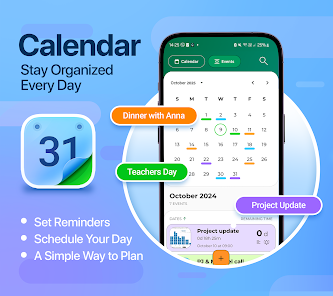
Are you looking for a Calendar app that can do more than just show you the date Then CalX is just what you need a schedule planner feature to help you stay organized and manage your time Easily create calendar reminders personalized schedule CalX offers all the tools you need to simplify your life Calendar CalX has an aftercall screen that gives access to the Calendar and Events just after a call This feature makes it possible for users to schedule events or add reminders immediately after an important call With its simple design and customizable features this app is your allinone solution for time management Stop feeling overwhelmed by endless tasks and appointments CalX makes it easy to plan ahead track your events and keep your life running smoothly Perfect for professionals students and families CalX is the schedule planner that adapts to your needs helping you stay productive and in control of your time Download CalX now and take charge of your schedule Key Features of CalX Schedule Planner Create edit and organize events in seconds Set Calendar Reminders Never miss an appointment or task again Customize Colors Personalize your calendar with colorcoded events Search Events Easily find your scheduled event by searching Stay on Track Use daily weekly and monthly views to manage your time AfterCall Menu Access the calendar easily after calls Calendar Planner Schedule Meetings Events Vacation With CalX you can plan your schedule in a way that works for you Add events appointments and tasks in seconds ensuring you stay on top of everything Whether youre managing work meetings family gatherings or personal projects this calendar app ensures that youre always prepared Use features like event priority settings and categorized organization to make the most of your day Set Reminders With Schedule Planner Life gets busy but CalX ensures you never forget an important task or event Easily set reminders for birthdays deadlines or appointments and receive notifications exactly when you need them Youll always know whats next on your agenda helping you stay organized and stressfree Customize Your Calendar to Suit Your Style One of the standout features of CalX is its ability to personalize your schedule Assign different colors to events reminders and tasks to visually organize your time This makes it easy to differentiate between work personal goals and other activities With a quick glance you can see your entire day laid out exactly as you want it Multiple Calendar Views for Easy Planning Switch between daily weekly or monthly views to organize your time more effectively With CalX youll never feel overwhelmed by your schedule Zoom in on todays tasks or take a broader look at whats coming up in the next week or month This flexibility allows you to stay in control of your plans no matter how busy life gets Why Choose Calendar CalX If youre looking for a calendar app that does more than just show you the date CalX is the perfect choice From simple event tracking to easyschedule customization this app offers everything you need to stay organized and efficient Heres why thousands of users might have chosen CalX It helps you plan your time easily Its customizable letting you organize your calendar in your own way It ensures you never miss an important event with timely calendar reminders It simplifies your life by keeping all your events tasks and plans in one place Dont let your busy life overwhelm you Take control of your day with Calendar CalX the allinone calendar planner for planning scheduling and organizing your time Download it now and experience how easy it can be to stay on top of your goals events and reminders
  • 평점
  • 평점 0
  • 무료

48

자세히보기

AOS

생산성

PARAKH

PARAKH39s versatility is showcased through its comprehensive set of features empowering administrators to effortlessly create dynamic forms tailored to their unique needs Administrators hold the key to designing forms that encompass a myriad of question types ranging from single and multichoice questions to multimedia elements such as videos and photos The inclusion of locationbased services text fields numeric inputs yes/no options and dropdown menus ensures that every aspect of information is captured with precision Once these dynamic forms are crafted the seamless workflow unfolds as users submit their responses PARAKH takes charge of the data journey dynamically adapting to the set hierarchy defined by the administrator This hierarchical flow ensures that the form progresses through various levels according to the structure established by the admin enhancing efficiency and adherence to organizational protocols What sets PARAKH apart is its fully dynamic nature allowing for realtime modifications and updates This fluidity empowers administrators to make onthefly adjustments responding to evolving needs without disruption The system39s adaptability is a testament to its commitment to providing a usercentric experience ensuring a seamless and intuitive process from form creation to submission and evaluation PARAKH stands as a pioneering solution revolutionizing how organizations handle dynamic forms and streamline their data collection and management processes
  • 평점
  • 평점 0
  • 무료

40

자세히보기

AOS

생산성

Scale Ruler - various scales

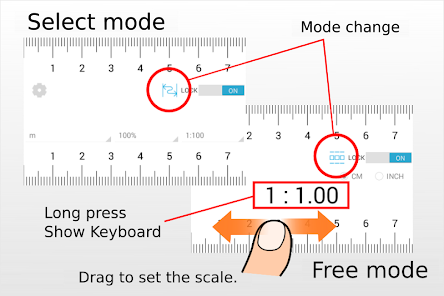
Scale Ruler is the simple application to display the scale of various measurement units Warning The accuracy of the scales cannot be guaranteed Please be sure the calibration How to use There are two modes Select mode In UNLOCKED state after choosing measurement unit magnification ratio and reduced scale the scale is displayed You can lock the scale on the ruler with a switch Free mode In UNLOCKED state and freely set the scale by dragging the screen to the left or right The setting range is from 1 1 to 1 100 When you press and hold the scale value the keyboard is displayed and you can enter the scale You can lock the scale on the ruler with a switch Sorry for the advertisement during unlocking Calibration As scale is displayed correctly ruler using the size of a credit card please do the calibration Please use a ruler as much as possible After calibration please tap the quotcalibrationquot button Calibration results are saved quotResetquot button the display of the scale to the initial state Save is not quotCancelquot button without saving the calibration results and exit the calibration Specification of Scale Ruler measure length meterinches magnification ratio 50 707 100 141 200 reduced scale  for meter    1100 1150 1200 1250 1300 1400 1500 1600  for inch   11 115 12 125 13 14 15 16  for inchArchitectural   11 12 14 18 112 116 124 132 148 164   196 1128 1192 1384  for inchEngineering 1120 1240 1360 1480 1600 1720 1800 1960 11080
  • 평점
  • 평점 0
  • 무료

44

자세히보기

AOS

생산성

46

자세히보기

회원로그인

회원가입

브랜드 소프트쉐어

대표 김동영

사업자번호 428-81-02729

통신판매업신고번호 2023-부산해운대-0096호

개인정보책임자 김동영

주소 : 부산광역시 해운대구 센텀중앙로 78, 센텀그린타워 504호